You finally sit down to write that email. Maybe it's a follow-up to a client. Maybe it's a tricky message to your kid's teacher. Maybe it's the third attempt at wording a complaint to your insurance company that doesn't make you sound unhinged.
You know what you want to say. You just can't get the words right.
So you open ChatGPT, type "write an email to my insurance company about a denied claim," and get back something that starts with "I hope this message finds you well" and ends with "I look forward to your prompt resolution of this matter."
It's… fine. It's also clearly written by a machine. Nobody talks like that. And if you wouldn't say it out loud, you probably shouldn't send it.
Here's the thing — ChatGPT is actually pretty good at helping with emails. The trick is knowing how to ask. Let me walk you through it.
First, What Is ChatGPT?
If you haven't tried it yet, ChatGPT is a free tool from a company called OpenAI. You go to chat.openai.com, make an account, and start typing. Think of it like texting a very well-read assistant who never sleeps. You type what you need, it types back.
The key thing to understand: the better you explain what you want, the better the result. That request you type in? It's called a "prompt" — which is just a fancy word for your instructions.
Step 1: Don't Just Say "Write an Email"
The number one mistake people make is being too vague. "Write an email to my boss about taking Friday off" gives ChatGPT almost nothing to work with. You'll get something generic, and then you'll spend ten minutes editing it anyway.
Instead, give it context. Tell it:
- Who you're writing to — your boss, a client, your neighbor, a company
- What the relationship is like — formal, friendly, somewhere in between
- What you want to accomplish — get a refund, ask for time off, say thank you
- How you normally sound — casual, professional, warm, direct
Here's an example of a better prompt:
That one extra minute of explanation saves you five minutes of editing.
Step 2: Give It Something to Work With
ChatGPT doesn't know your situation. If you're responding to someone, paste in the email you received (or summarize it). If you're writing a complaint, include the key facts — dates, names, what happened.
You don't have to be organized about it. You can literally type:
That messy brain dump? ChatGPT can turn it into a clean, well-organized email. That's actually what it's great at — taking your jumbled thoughts and putting them in order.
Step 3: Ask for a Specific Tone
This is the secret weapon most people skip. ChatGPT defaults to sounding like a mid-level corporate manager unless you tell it otherwise. So tell it otherwise.
Try adding phrases like:
- "Write it like I'm talking to a friend"
- "Keep it professional but warm"
- "I want to sound confident, not aggressive"
- "Make it sound like a real person wrote it, not a form letter"
- "Shorter sentences. No fluff."
You can even say "Write it the way a teacher would say it" or "the way a small business owner would say it." ChatGPT is surprisingly good at adjusting its voice when you give it a character to aim for.
Step 4: Say "Try Again" — It's Free
Here's something that surprises a lot of first-time users: you're not stuck with the first answer. If the email comes back too long, too formal, too stiff, or just not right, tell it what to fix.
- "That's too formal — make it more casual."
- "Shorter. Like half that length."
- "Lose the first paragraph, it's too much."
- "Can you make the ask clearer? I need an answer by Thursday."
Think of it like working with a writing partner. The first draft is a starting point, not the final product.
Step 5: Read It Out Loud Before You Hit Send
This is my personal rule, and it has nothing to do with AI: before you send any important email, read it out loud. If it sounds like something you'd actually say to the person, you're good. If it sounds like it was generated by a customer service bot from 2019, rewrite it — or ask ChatGPT to try again.
AI is a drafting tool. You're still the editor. You know the person, you know the situation, and you know what sounds like you. The final call is always yours.
ChatGPT doesn't know your tone, your history with the recipient, or the unspoken dynamics of your workplace. You have to bring that context yourself.
Also, don't paste anything truly sensitive — medical info, financial details, passwords — into any AI tool without understanding how that data is handled. For a routine email, you're fine. For anything involving private information, be thoughtful.
Your Move
Next time you're staring at a blank email, try this approach. Give ChatGPT the who, what, why, and how-you-want-it-to-sound, and see what comes back. You might be surprised how much time it saves — not because it writes the perfect email, but because it gives you something real to work with instead of a blinking cursor.
And if the first draft sounds like a robot? Just tell it. It can take the feedback.
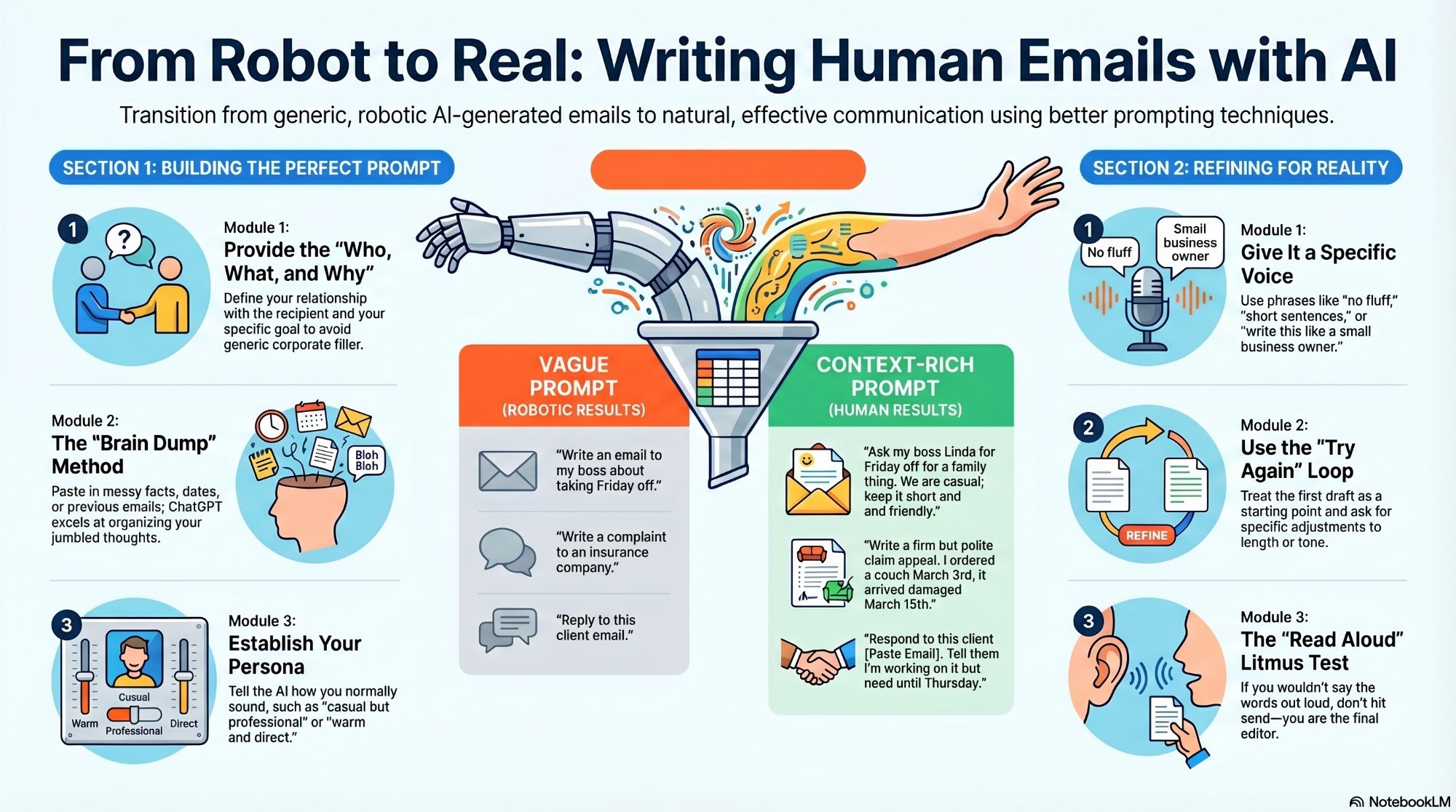
The short version: better input = better output.